Twice
Landing Page
Onboarding Process
Finishing Onboarding
Grounding Yourself
Stats for Nerds:
- Team Size: 1
- Timeline: 2 months (ongoing)
- Language: TypeScript
- Framework(s):
- React Native + Expo
- Tools:
- Cursor
- Deployment: [APP BUILD]
- Repository:
Privated - Current Build: BETA v0.5
The Concept
What inspired you?
Twice is an app built to help manage, track, and centralize communication within ones own mind. The target audience is people with Dissociative Identity Disorder (DID) or Other Specified Dissociative Disorder (OSDD). This app was built for myself and my friends; as someone who lives with OSDD, with many similarly-spec’d people in my life.
The goal of this application is to help people with DID or OSDD to manage their system (the collection of alters/identities), see who’s fronting, communicate internally, and use safety tools
So I’ll preface this with - I am not an App developer. This is my first time dipping my toes into this world, but I will say; I absolutely love it.
Words cannot describe the joy I felt when I saw “Hello World!” on my personal phone, in an application I had built, from a development environment inside my Android Studio. It was as I had been teleported back 8 years to my very first HTML website in school; the sheer elation of seeing something I wrote pop-up on a screen I was so familiar with. So, without further ado, I set off into the uncharted wilderness of Android application development. Luckily for me, React Native is really popular, and I’m wicked good at React.
The Structure
All the pieces
The Technical
The good, the bad, and the technical
The application itself is built on a React Native core, utilizing Expo and Drizzle for my local DB, and Zustand for storing my application state. The styling is done with React Native Paper, and a healthy dose of stylized components.
React Native was my choice for stability and familiarity; I have a very strong background in both React and TypeScript, and with the ability to deploy to both Android and iOS, it was an easy pick-up. I use Expo because of it’s robust library of modules; router, sqlite, local-auth, and secure-store being our primary touch points.
Drizzle and Zustand were the recommended packages for my ORM and Storage solutions respectively.
The App Flow
What does it look like?
Onboarding
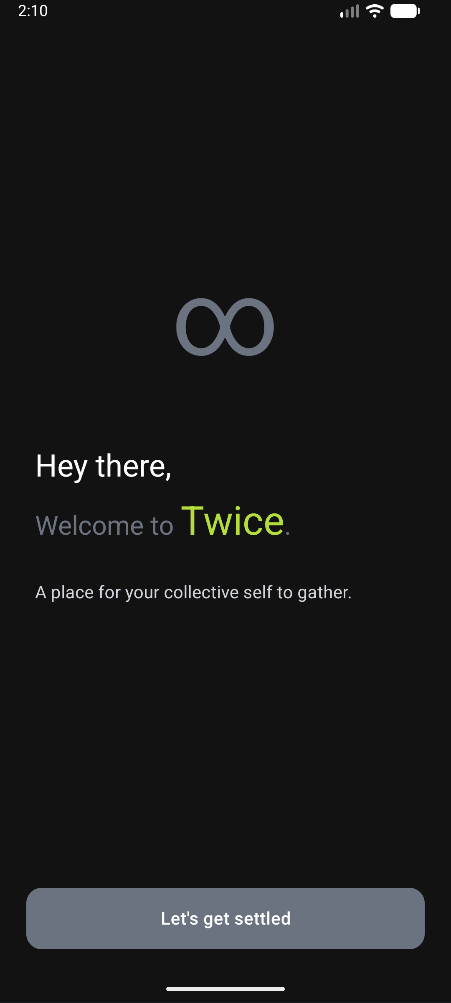
The user is initially greeted with an onboarding process.
Landing Page
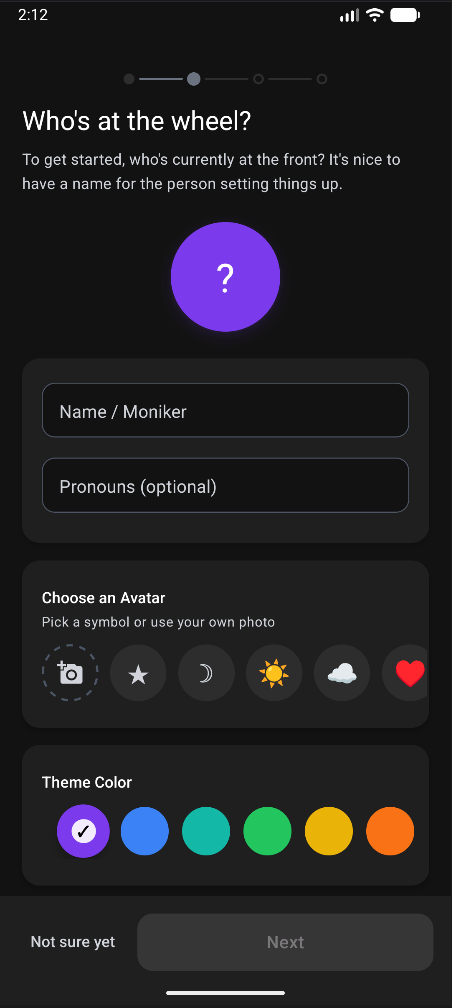
Onboarding Process
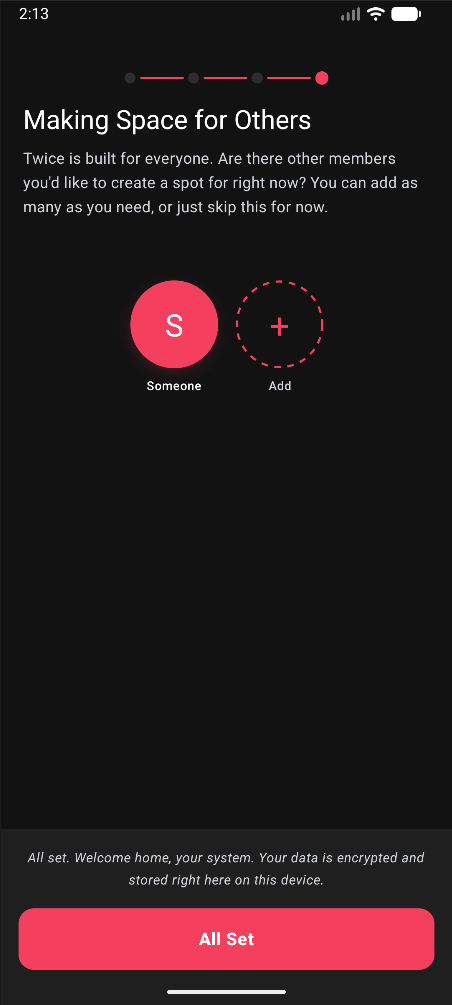
Finishing Onboarding
This is where the user is guided through the initial setup process. The goal was to create something as non-restrictive as possible, while allowing for a high degree of freedom and customization out of the box.
Before we even finish the onboarding, the user will have already set their preferred theme color (associated with their primary fronting alter) and personalized the app to their liking - as can be seen with the red coloration in the third photo above.
The App
The thing everyone came here for
The app houses something called “The System Web”. This is a bubble assortment of visualized alters. They can be assigned a color, a profile image, or a custom provided icon (as shown in the image). The primarily fronting alter is displayed in a larger bubble state, with a subtle glow effect. It is also present in the top bar of the system, as well as through that alters preferred coloration across the application.
The System Web
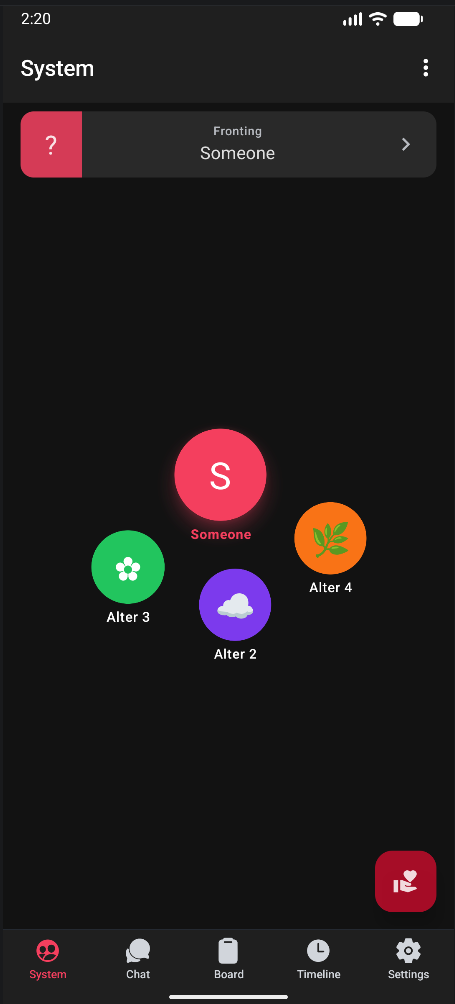
This also respects the currently selected alters preferred color themes. Example, if Alter 2 were to be set to fronting, the color palette of the app would reflect their choice of green.
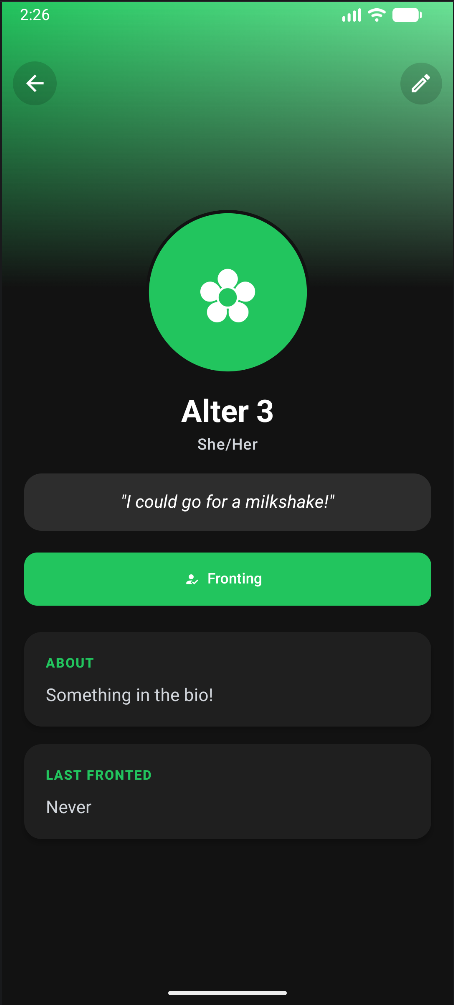
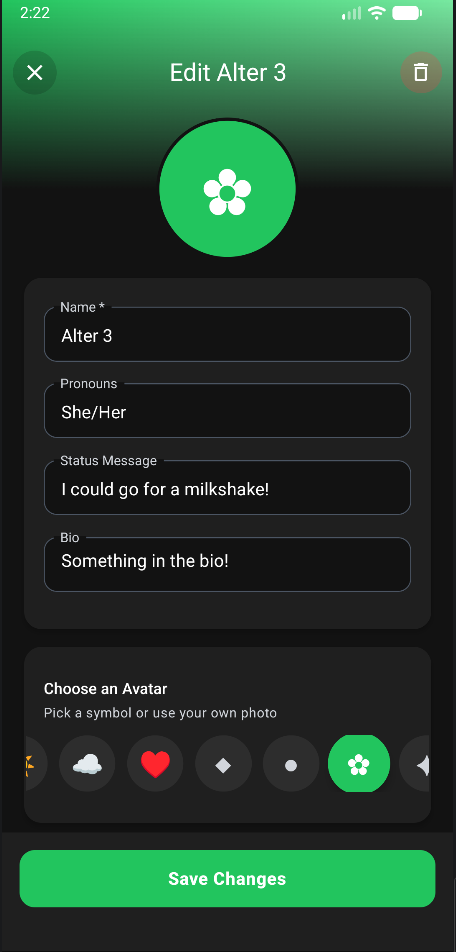
We also include full bios for each alter, allowing them to be fully customized.
The Bio
Editing the Bio
The Chat
It's a group chat, but for yourself!
One very big thing about OSDD / DID is the constant internal dialogue. Sometimes, these voices just need to speak. Their words need to reach paper, because simply speaking them within the mind is not enough.
That’s where the chat comes in.
The Chat
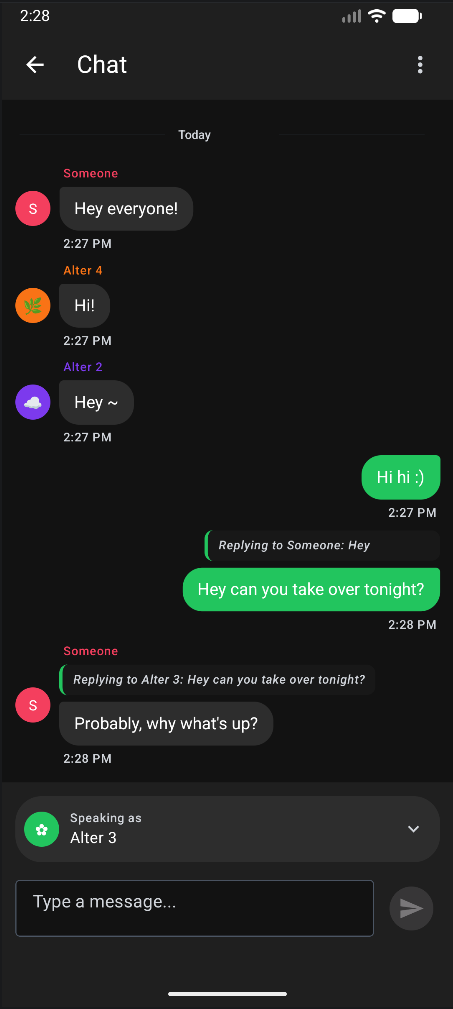
The chat is one of my favorite parts of this application, because it functions as a group chat, but it’s always seen from the perspective of the fronting alter.
To help this make sense, I’ve attached an image of the chat above. This is seen from the perspective of our hypothetical placeholder alter of equivalent name, Alter 3.
Alter 3 views the chat from her perspective, with her preferred color theme. Speaking with the others is as simple as speaking in the chat. If another wishes to speak, a simple swap of whos voice is being spoken with can be done with the selection box above the chat input.
However
When a swap occurs, and another takes the drivers seat, we accomodate this by shifting the entire chat view to their perspective - and we do this dynamically.
The Chat, from another perspective
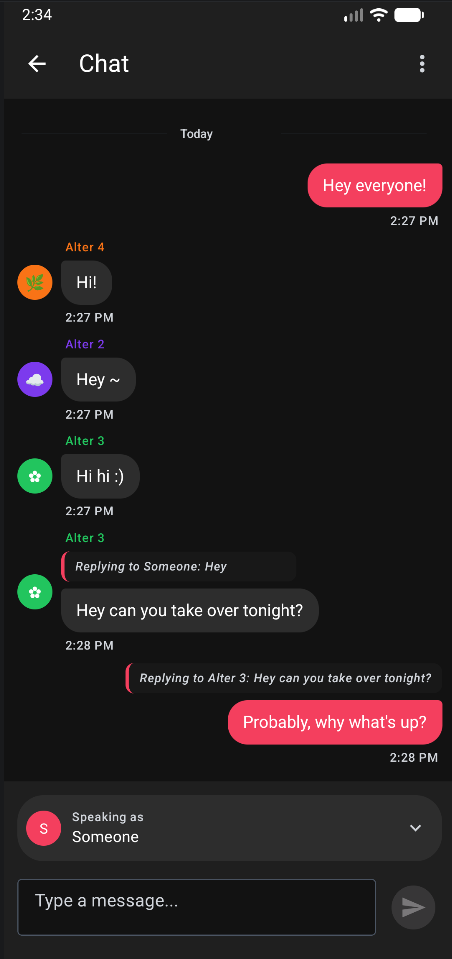
Here we can see the same chat from the perspective of our other hypothetical placeholder alter, Someone.
“Someone” in this case is fronting. The app has take on their preferred color styling, and the group chat now shows from their perspective as the sender.
Also note the reply feature - that was a new addition as of v0.5!
I’m really happy with how this turned out, I had a blast working on it, and it’s by far one of my favorite portions of the application.
The Grounding Screen
For when you split and can't find yourself
Splitting and swapping are to be expected, but you can’t always plan for when it happens. You could be at the grocery store, and suddenly someone wants to take over. You split, hard, and you have no idea where you are anymore. The surroundings feel unfamiliar, you don’t remember coming to the store.. Who are you again?
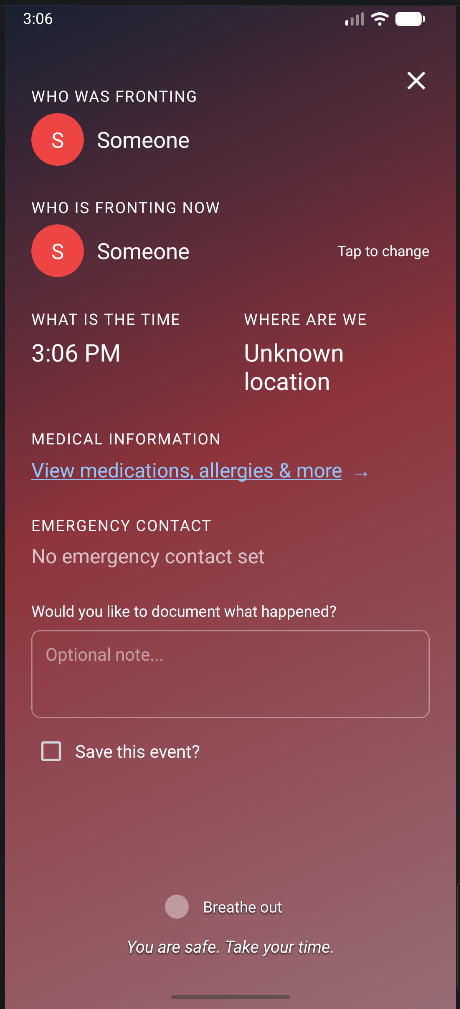
Grounding Yourself
A simple screenshot does not do this page the justice it deserves.
Everything on this page is built to give you the information you need, when you need it.
The background is a gradient that matches the color patterns of the currently fronting alter. It follows a boxed breathing technique, which is mirrored by text on the bottom and a small graphic that instructs the “breathe in, hold, breathe out, hold” interval.
Who was fronting will give you an idea of who was fronting when you split, and if you need to change who is currently fronting, the option to do that is done here.
It shows the time, and will poll your location to give you an idea of where you are. The medications & allergies will link you to the Body tab, which gives a breakdown of medications and other necessary medical information.
If an emergency contact is set, it will show their name and phone number. Tapping the phone number will open the phone screen and dial for you, giving you immediate access to help in the case where you need it.
The optional note is there for adding your own notes, documenting why/how you split if you so desire.
If you choose to save the event, it will create a low priority note in the Board with the date and time of the grounding event. If you choose to swap alters during this event, it will log who was fronting before and after, along with any notes you choose to add.
The Board
High-level Note Taking
Task management is already hard enough. DID / OSDD sometimes have things called “memory walls”, where an alter will purposely withold memories from the rest of the System.
This task management system is an attempt at alleviating that, by giving those alters a place to put reminders. We tag each card with the creating alter, so at a glance we know who made what.
The Board
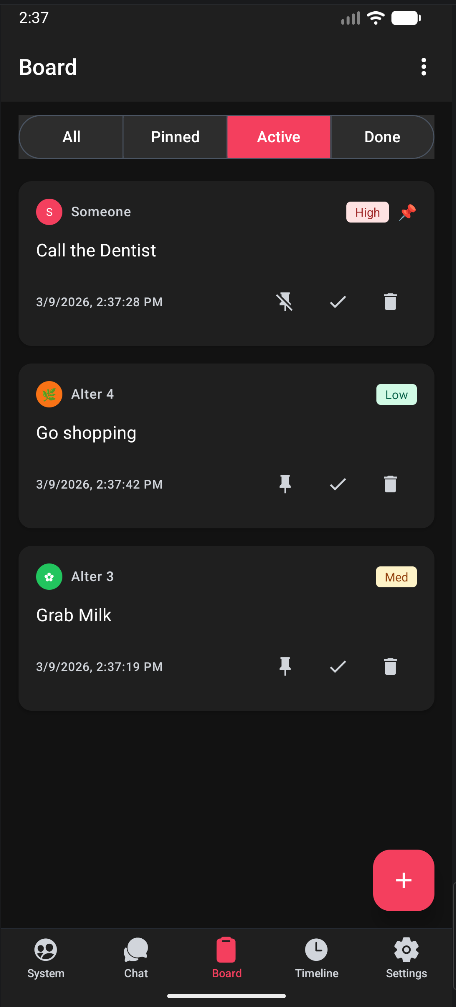
It may seem simple, but it’s incredibly robust and very much so a necessity.
This is also where we store logs for Grounding episodes.
The Timeline
Where was I again?
This is the analytical breakdown of self, which is one of the biggest reasons I personally use the app. I am a huge data nerd, and this was built from that passion.
An analytical breakdown of an alter
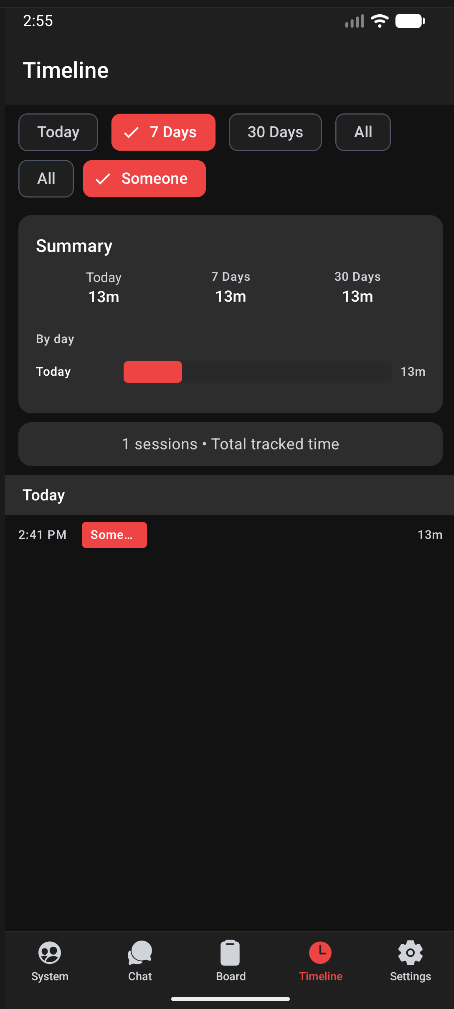
Within this page, we have a pie chart (shown as a bar graph in the photo) which correlates your percentage time that each alter has fronted over a given time period.
Within the selection of each individual alter (pictured) we can see an exact minute-level breakdown of their fronting times.
This is incredibly important for tracking patterns and hard splits, which are usually impossible to track otherwise. I wish I could gtive more statistics and breakdowns for this section, because of how important it is, but I do not have live data to show without doxxing myself.
Maybe in a future update to this section, I’ll make some mock data!
Just know, this is an incredibly important part of the application. The chart itself is a gnatt-style chart, showing each alter and their time fronting in ascending order.
The Settings
Settings are setting, but we support more than just settings!
We support device-level encryption, and data packages that encrypt before they even leave the application!
The Encryption
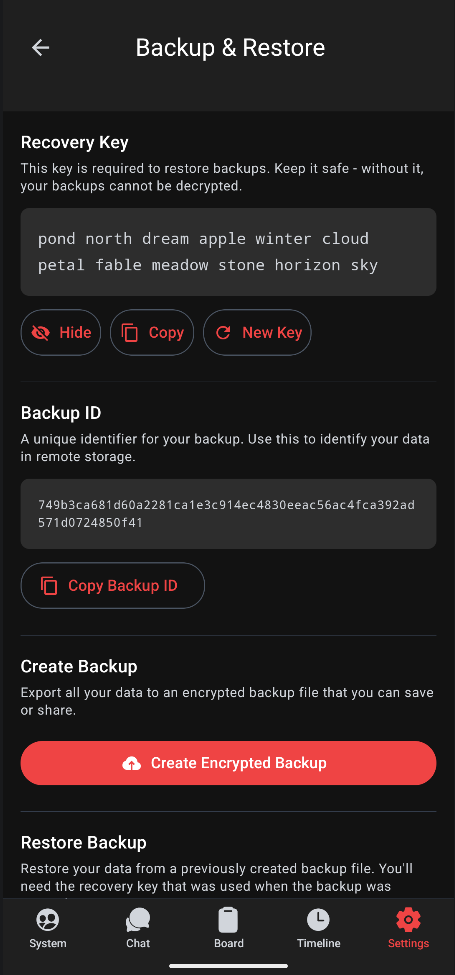
We use AES-256 Encryption, a 12-24 word pass phrase, and a systemId based on the phoneId itself to encrypt user data before it leaves the device.
The cloud backup system uses this system to encrypt data before it even leaves the phone, so we never actually see any of the users data. We see an encrypted blob, and a backup ID.
If the user so chooses, they can skip the cloud back-up entirely and simply save an encrypted backup to their phone, using the randomly generated pass phrase to decrypt their data on a new device if they choose to recover the old files.
Security is a really important factor for me, especially when it comes to things like this.
Also note the coloration ~ everything follows the theme!
We also support things like a pin / biometric lock, and per-alter background images for each screen. For the images, I use a double-layer of compression and an image selector; we never store the images, we simply compress them for use within the application at build time. It’s incredibly fast!
The Final Project
This project is something that I plan on maintaining going forwards. There are no pay walled features within the app, and no ads. This is built for the DID / OSDD community, by the DID / OSDD community.
The feedback has been spectacular from my beta testers, and the pool only continues to grow!