Masterful Scrum
AI-based ticket management, built for the lazy innovative JIRA admin.
Dashboard
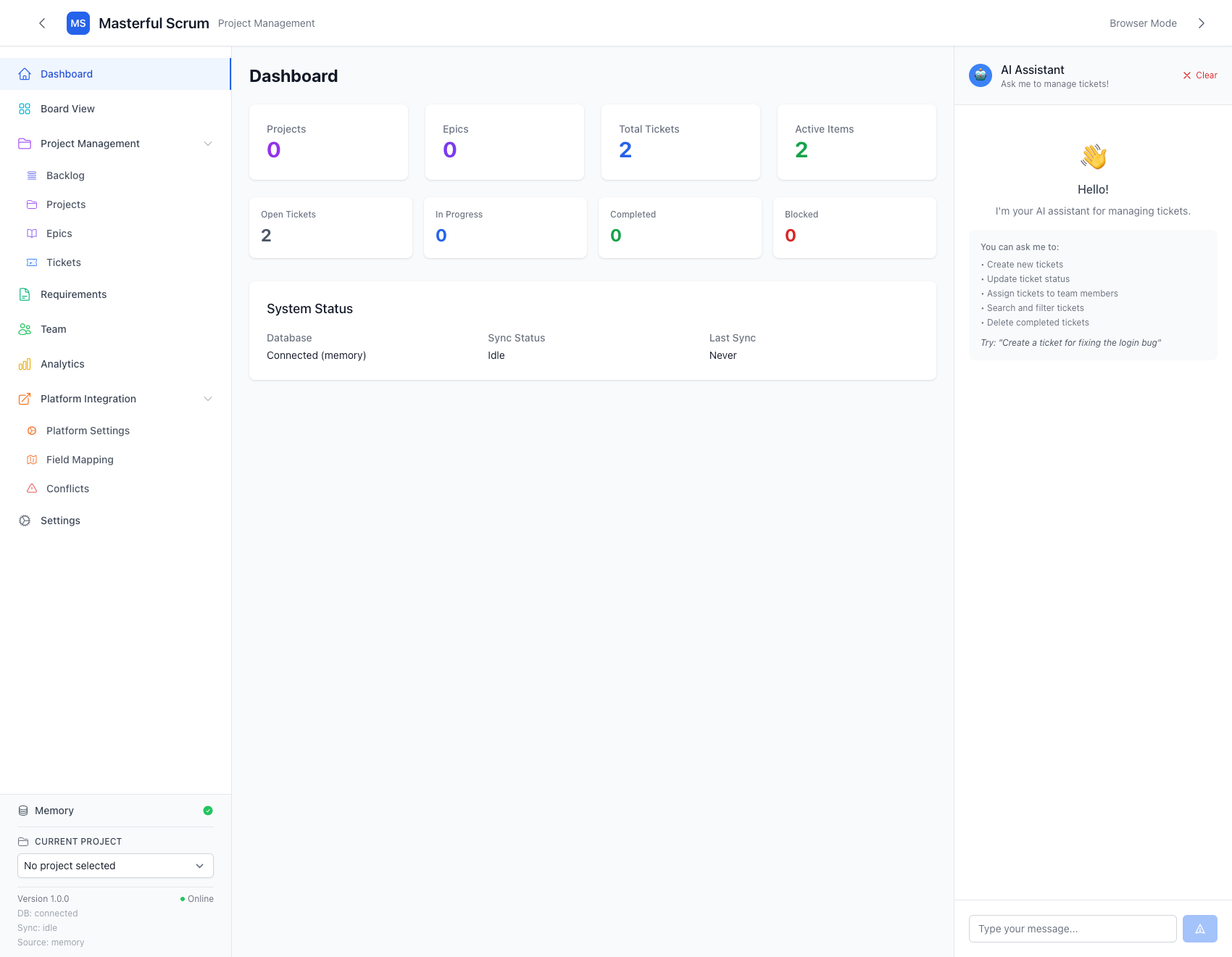
Stats for Nerds:
- Team Size: 1
- Timeline: ~ 1 month
- Language: JavaScript
- Framework(s): Electron, React, NextJS
- Tools: Cursor, v0, Tailwind CSS, Hero Icons
- Deployment:
No Deployment - Repository: https://github.com/Serrowxd/masterful_scrum
The Concept
There's a method to the madness
Masterful Scrum began life as a solution to a logical conundrum. I really enjoy using work tickets, I just don’t like having to write them.
I began with a base concept: Something self-contained that I can run on my local PC, with a cloud-based ticket storage solution. The primary focus being on the self-contained nature of the project; how do you build something that is both secure and functional, with a minimal footprint?
The first proof of concept utilized Electron and NextJS for my baseline, with a local SQLite server running on a docker container. I chose Electron as my local application due to it’s compatibility with React and my familiarity with the platform, and NextJS to allow me to tap into the React ecosystem.
After a few days of POC mish-mash and a handful of choice words directed at my Github Co-Pilot, I had a functional application. It wasn’t perfect, but it was certainly a start.
The Structure
What's it made of?
I’m a firm believer that a beautiful application is just as important as a functional one, so I built my UI in a way that felt familiar to Jira users - my targeted demographic. I built the UI with TailwindCSS components with as minimal override as possible, following a design pattern that I had mocked in Figma and MSPaint; Yes, I used Microsoft Paint to do my mock-ups. I’ll do it again. This is a threat (with love). 🤍
I identified the four pillars that I wanted to build the project around, and built the scaffolding with this in mind:
- Respecting Source of Truth
- Easy and familiar
- A Kanban board with cool animations
- Modular design structure
With these concepts in mind and a new-found appreciation for Cursor (sorry Co-Pilot), I began pushing into my primary initiatives for this project.
Respecting Source of Truth
Good data handling
I can’t think of anything more irritating than losing work to things outside of your control. Forgot to save and your computer crashed? That’s on you, bucko. The application sync’d the changes and deleted your local data in favor of matching the source of truth? Unfathomable rage.
Storage Solution
The four elements lived in harmony
In-Memory, Local, Cloud. The three big data pools lived in harmony, and they still do thanks to conflict resolution and field mapping. You can read more about that here (Platform Integrations).
The storage solution uses a multi-tier fallback: Electron → HTTP API → localStorage.
In more simple terms: “Can I reach the local SQLite storage” → No → “Can I fetch from the Cloud” → No → localStorage via in-memory, save updates to JSON automatically, attempt to sync again using a recursive back-off.
“That feels very over-engineered” I can hear you saying. You’re right, it absolutely is, but this was built to be a proof-of-concept. Nothing sucks more than having your application fail to work during a tech demo, so we just never.. Not.. Fail to work.. Or something like that.
Tickets are stored in JSON format, following a super simple structure that we define using the JIRA ticket schema, and then Users (a future implementation) would have been associated to their respective tickets via the team management page; we manage team members in name and ID only, to respect customer data privacy.
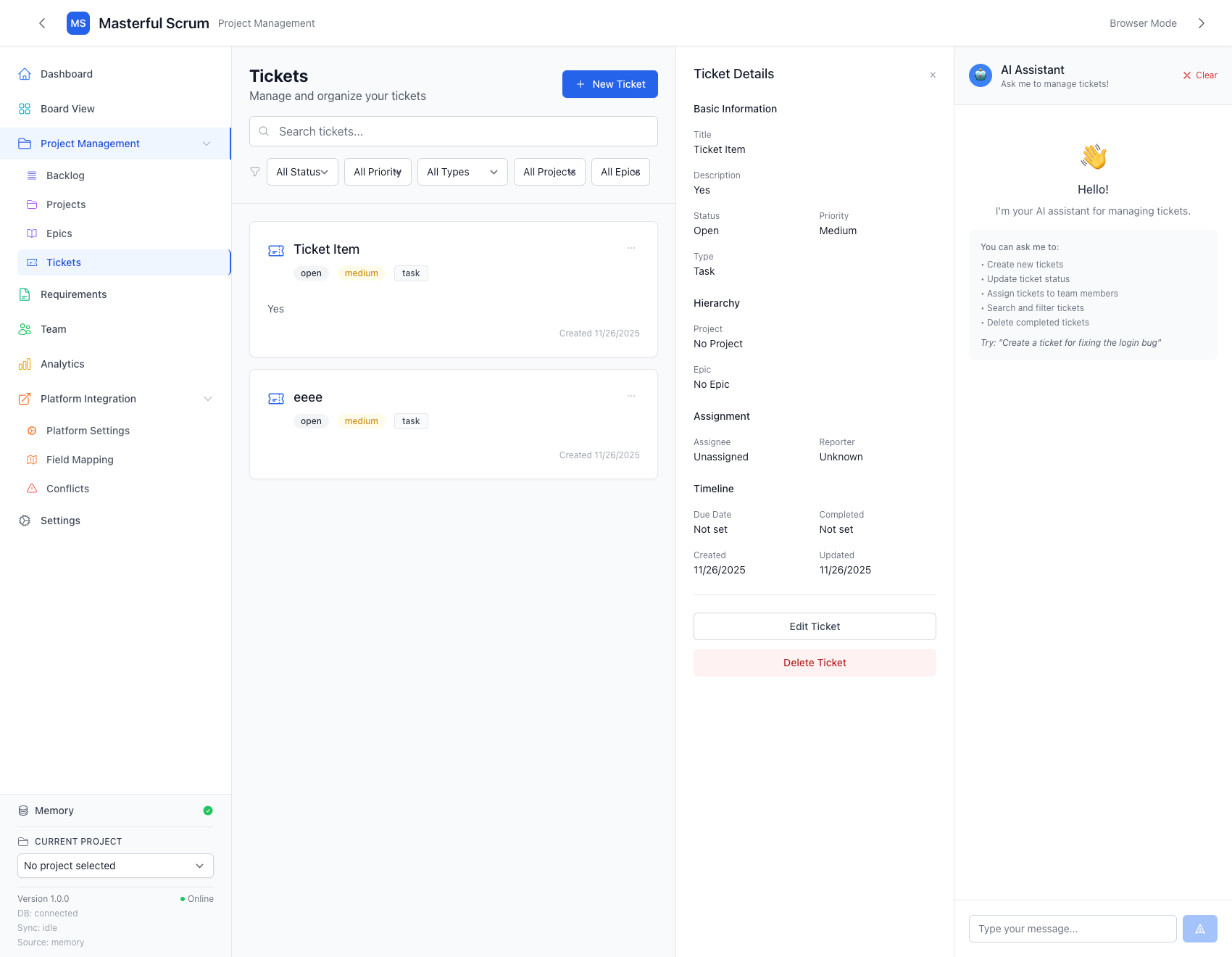
In the bottom left, you can see “Memory” with a little green check mark, and some stats for nerds under the current project. This is a visual representation of what data set is currently being used, the status of any pending or active sync jobs, and the health of that connection.
This bundle has 3 states:
- Red: Shows a red (x) marker, and provides a simple “Disconnected” error. This means the sync failed, or something went wrong.
- Blue: A blue spinner, with a “running sync..” status. This means a data sync is in-progress, and it will remain in this state until either fails (Red) or succeeds (Green).
- Green: A green check mark, with an “idle” status. This means the data has been synchronized, no changes have been detected, and the endpoint is healthy.
It will run an automatic synchronization every 5 minutes (configureable) to check for any changes in the cloud and pull them down.
The cloud data will always be the source of truth if the application is unsure.
I wanted to use a zero-ownership approach with it, so you can’t accidentally wipe your entire ticket system on accident. Data is only pushed to the cloud when the user runs a manual upload, and we always make a back-up of the current project state (with a timestamp) incase of failure.
Platform Integrations
Everyone say "Thank you git"
==“You don’t need to reinvent the wheel, someone already did that.”== ~ My Mom, circa. 2024
I wasn’t setting out to replace Jira, Trello, or whatever abstract systems your current ticketing system lives inside of. I wanted to build something that played nice with everyone, so I built the platform integrations system.
This is where usually put a screenshot of the finished Field Mapping project, but that was a feature that was never fully completed. So, I’ll explain it in Markdown context!
[Ticket Name] -> [Name of Ticket]
[Project Name] -> [Name of Project]
[Ticket Description] -> [Some arbitrary whatever naming convention]
The concept is inspired by something I worked on in a previous role, with the idea being this: Not every service is going to have the same fields, and they’re not all going to map the same, but we should still support them.
When a user creations an integration with their respective provider, they can simply map the fields that their application supports to the ones we support via a visual arrow-pointer system. If we don’t support it, they can make a new field that will appear on the ticket. Simple!
Then we get into the real meat of how we handle the data sync: Conflict Resolution.
Heavily inspired by git, I built a conflict resolution system that would check incoming data against our local changes. If something overlapped, it would flag that ticket as a conflict. The user would then be presented with a side-by-side of each ticket - Cloud vs Local. Conflicting information would be clearly labeled, and the resolution would be handled in-app before a further sync could happen.
Like with the rest of the Platform Integration section, this unfortunately never made it past the concept phase, but it’s still worth noting.
Easy and Familiar
Hey, that looks like Jira!
The entire project was built using the same design language, colors, and component break-downs as Atlassian’s Jira. The goal was to keep it simple, and keep it familiar. No guess work, only functionality.
I used TailwindCSS as my base framework, and did very little overwriting. Emoji’s were included to give a more playful visual feedback to tickets, and the AI itself was prompted to be more of a super intelligent friend than a hyper-strict professional worker.
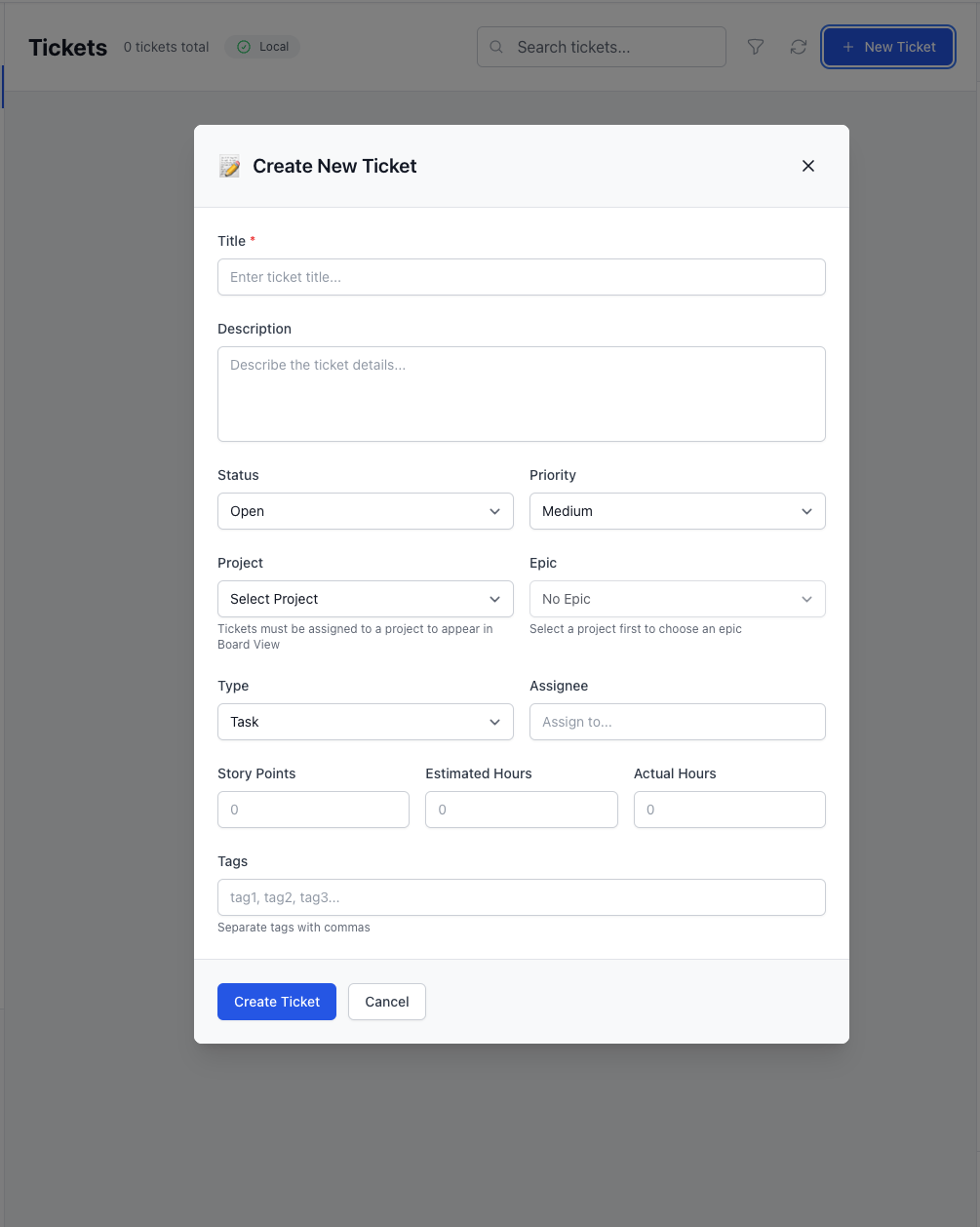
Ticket Creation Modal
A Kanban Board with Cool Animations
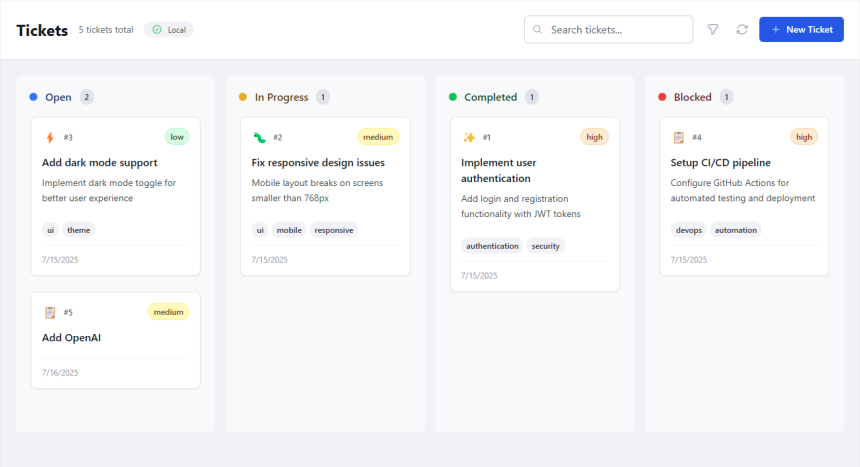
Everything was built and designed personality-forward, while still respecting the design language and usability of the application. The board itself was built using a package called React Beautiful DnD, which I highly recommend for animated drag and drop functionality.
Modular Design Structure
All the components in this project were built with an adapter pattern and an event-driven architecture. The goal was to have something that could easily be vibe-coded at scale, while staying within the token constraints of most AI models at the time of writing this (around 200-256k).
src/
├── ai/                    # AI processing module
│   ├── aiProcessor.js
│   ├── openaiProcessor.js
│   └── ticketGenerator.js
├── database/              # Database abstraction layer
│   ├── database.js
│   └── sqlite-adapter.js
├── platforms/             # Platform integration module
│   ├── adapters/          # Platform-specific adapters
│   ├── BasePlatformAdapter.js
│   ├── syncEngine.js
│   ├── conflictResolver.js
│   └── autoSyncManager.js
├── main/                  # Electron main process
│   ├── main.js
│   ├── routes/
│   └── handlers/
├── renderer/              # React frontend
│   └── src/
│       ├── components/
│       ├── types/
│       └── utils/
└── utils/                 # Shared utilities
    ├── encryptionService.js
    ├── oauthManager.js
    └── conflictResolution.js
With this in mind, we’re able to direct agents towards specific portions of the application, or work on entire new feature sets that can be rolled out via feature flag, without having to rewrite old functionality.
The Final Project
This project unfortunately fell into the “I’ll probably finish you later” bucket, fueled by my project-swapping ADHD brain. As such, it doesn’t have any deployments, but you’re welcome to check out the Github link and pull it down locally to play with.
I may revisit this at a future date, as the concept is definitely functional and will one day become a very big part of our industry, but for now it will just sit in my portfolio as a thing that I did.